
At first glance, an umbrella payslip can look incredibly confusing. To help you make sense of it, it is easiest to think of your payslip as being split into two distinct sections:
1. The Top Section (Above the Line): Company Income & Costs
This part details the financial transaction between your recruitment agency/client and the umbrella company. It includes:
-
The total assignment rate received for your work (Company Income Received).
-
The company’s employment costs (such as Employer’s National Insurance, Apprenticeship Levy, and pension contributions).
-
The umbrella company’s margin.
2. The Bottom Section (Below the Line): Your Personal Pay
This is the standard PAYE section that details your actual earnings. It outlines:
-
Your gross taxable pay (including your Basic Rate and any Additional Wage).
-
Your personal deductions (Income Tax, Employee National Insurance, and student loans).
-
The final net take-home pay that will land in your bank account.
Summary: The top half shows what the umbrella company received and deducted to employ you legally; the bottom half shows what actually belongs to you.
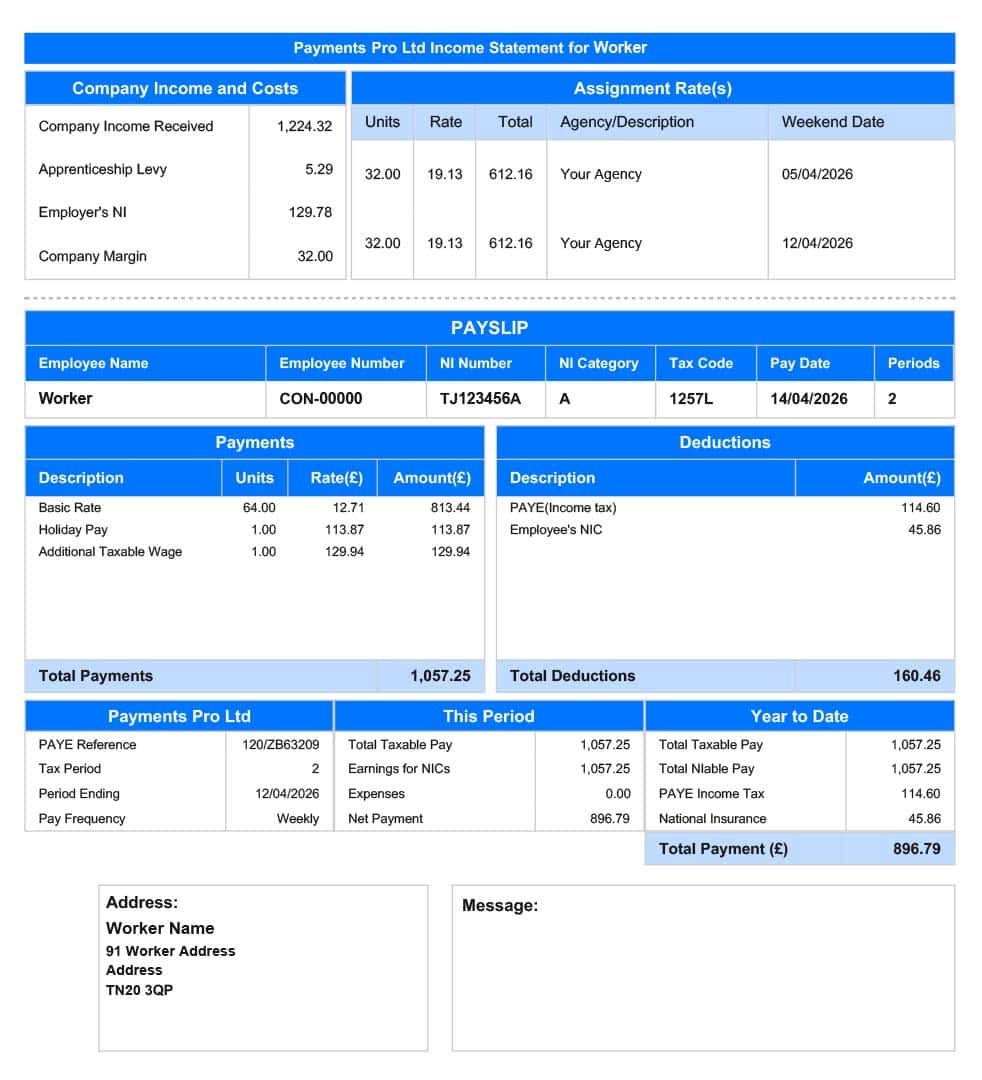
The Top section
Why Company Costs Are Listed First
The section above the serrated line details the employer-related costs of your assignment.
As your legal employer, the umbrella company is responsible for paying Employer’s Pension, Employer’s National Insurance, and the Apprenticeship Levy directly to HMRC. To cover these legal obligations, these costs are factored into the assignment rate received from the agency.
If you accrue holiday pay, this will also be shown here, as well as the Accrued Employment Costs On Holiday Pay
Once these company costs and the umbrella margin are deducted from the total invoice amount, the remaining balance becomes your gross taxable pay (the starting point for the bottom half of your payslip).
Key Takeaway: These aren’t deductions from your agreed salary; they are the legal costs of employment deducted from the assignment rate before your salary is calculated.

The Bottom section
Everything below the serrated line is specific to you and your earnings. This is the traditional PAYE (Pay As You Earn) layout that looks just like a standard payslip from any regular job.
Now that the company’s employment costs have been handled in the top section, this bottom half shows exactly how your remaining gross pay is processed. It details your individual tax code, your student loan repayments (if you have them), your personal Income Tax, and your Employee National Insurance deductions.
The very final figure at the bottom is your net pay – the exact amount of money that will be transferred into your bank account.

Right at the top of this personal section, you will find all the essential details that identify who the payslip belongs to, along with the core figures used to calculate your pay for that specific cycle.
This includes:
-
Personal Details: Your name, employee number, and National Insurance (NI) number.
-
Tax Code: The code provided by HMRC that determines how much tax-free personal allowance you get before tax kicks in.
-
Pay Date & Period: When the money will hit your account, and exactly how many weeks or months of work this specific payment covers.
The Earnings & Deductions Breakdown
Directly below your tax info, the payslip splits into two clear columns: Payments on the left and Deductions on the right.
Left Column: Payments (Your Gross Earnings)
This section breaks down exactly how your total gross pay is calculated before any tax is taken out:
-
Basic Rate: Your hours worked calculated at the National Minimum Wage (NMW).
-
Additional Taxable Wage: The rest of your agreed pay (everything above the minimum wage).
-
Holiday Pay: Your accrued holiday earnings, if you have chosen to have them paid out with each cycle rather than rolled up.
-
Expenses: Any approved business expenses you claimed for that period will also appear here.
Umbrella companies split your pay into two sections to legally guarantee you receive the National Minimum Wage (NMW) for every hour you work, while still allowing you to be paid your full assignment rate.
Right Column: Deductions (Your Personal Taxes)
Directly opposite your earnings is the deductions box. This is a simple summary of all the personal money being taken out of your gross pay for HMRC, including:
-
Income Tax (PAYE) (any figure in brackets will indicate a refund)
-
Employee National Insurance (NICs)
-
Student Loan repayments (if applicable)
-
Pension (if applicable, any figure in brackets will indicate a refund)
-
Statutory Deductions (if applicable, DEO, DEA etc.)
- Net Pay Already Processed (this is any previous payment processed in the same tax-week/month)

At the very bottom of the payslip, you have summary information.
